

Open Gaffa's Scout Hub, apply your filters, and you can complete a full data-led recruitment cycle in one browser session without creating an account. The workflow is five steps: Open Scout Hub → apply preset filters → build shortlist → validate profile → make offer. Here's a quick preset to paste in right now and test: young players with strong playtime, above-average performance percentiles, and contracts ending within a year. That single filter set surfaces young, game-ready players whose contracts are running out, which is exactly where the value hides.
Key Takeaways
Data-led scouting in Gaffa works because the longlist-to-shortlist filter pattern cuts 200 candidates down to 15 in under five minutes, leaving you time to validate and sign in a single session.
| Point | Details |
|---|---|
| Start with the workflow | Open Scout Hub, apply a preset, shortlist 10–20, validate profiles, then make your offer. |
| Filter on role metrics | Use per-90 percentiles for your specific role, not overall rating, to find system fits. |
| Target contract expiry | Players with under 12 months remaining cost less and negotiate faster. |
| Keep presets consistent | Running the same preset each window lets you compare results across transfer windows. |
| Play free on Ballknw | Gaffa's Scout Hub is free, no-login, and saves progress directly in your browser. |
Table of Contents
- What does data scouting mean inside Gaffa?
- How do you open Gaffa's Scout Hub and run a first search?
- Which metrics and filters actually matter in Gaffa?
- A repeatable scouting workflow to run every transfer window
- How to read a Gaffa player profile: what each field actually tells you
- Three ready-made scouting presets to try right now
- What data scouting in Gaffa won't do
- How to turn a Gaffa shortlist into a signing
- Where does Gaffa's scouting data come from?
- The case for keeping data scouting simple
- Gaffa is free, no login, and ready to play right now
- Sources
What does data scouting mean inside Gaffa?
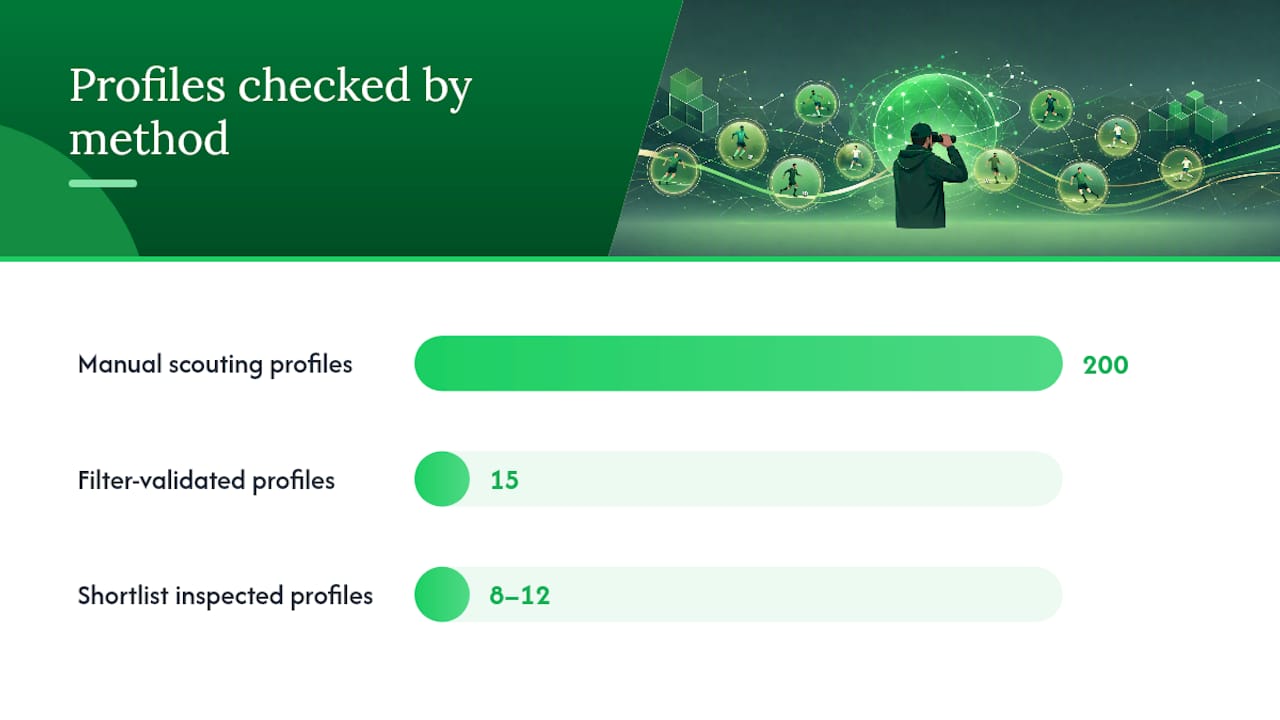
In most football games, scouting means clicking through roster after roster and hoping something catches your eye. Data scouting in Gaffa flips that. You set filters drawn from public football datasets, and the game's Scout Hub returns only the players who clear your thresholds. Instead of manually checking 200 profiles, you're validating 15.
The longlist-to-shortlist pattern is the core habit. Your longlist is every player who passes your initial filters. Your shortlist is the 8–12 you'll actually inspect. That two-stage approach is what moneyball-style scouting guides consistently recommend: filter for outliers first, then validate fit.
Concrete benefits of working this way in Gaffa:
- Hidden gems in lower leagues surface because filters don't care about reputation.
- Contract expiry exploitation lets you target free agents before rivals do.
- Timeboxed sessions keep scouting from eating your whole evening.
- No login required means you open the browser and start immediately, with progress saved locally.
Data scouting is not about finding the best player. It's about finding the right player for your system faster than you'd find them any other way.
Ballknw built Gaffa around public football datasets and browser-based saves, so the data layer is always there, no external tools needed.
How do you open Gaffa's Scout Hub and run a first search?
No account, no download. Here's the exact sequence:
- Navigate to the Scout Hub from the main menu.
- Expand the filter panel — look for the filter chips along the top of the player list.
- Set your position first, then minimum minutes played, then your percentile floor.
- Add a contract expiry window if you're targeting free agents or cheap signings.
- Hit Search and watch the longlist populate.
- Check the shortlist count in the top-right chip. Aim for 10–20 results before narrowing.
- Click Add to Shortlist on any player whose headline numbers look right.
Saving works entirely in-browser. Gaffa writes your shortlist and squad state to local storage, so closing and reopening the tab picks up where you left off. No cloud sync, no account wall.
A few things to look for in the UI:
- Filter chips at the top of the list show your active constraints at a glance.
- Shortlist count badge tells you when you've gone too broad or too narrow.
- The Scout Guide on Ballknw walks through each filter field if you get stuck.
Which metrics and filters actually matter in Gaffa?
Not all stats are equal. The ones worth filtering on are the ones tied to your system, not the ones that look impressive on a card.
Core metrics to know:
- Per-90 values normalize output across players with different minutes, so a player with 900 minutes and strong per-90 numbers often outperforms a starter with weak per-90 figures.
- Percentiles compare a player against peers in the same position and league tier — a 75th-percentile pressing stat means more than a raw number.
- Progressive passes flag players who move the ball forward under pressure, useful for midfield and wide roles.
- Pressing efficiency (pressures leading to turnovers) identifies high-energy forwards and defensive mids.
- Minutes played filters out players with too small a sample to trust.
Why archetype weighting beats overall rating: sorting by overall rating finds stars, not system fits. Higher Tempo Press notes that Football Manager-style simulations reward managers who combine tactical intuition with rigorous stat analysis. Target the two or three metrics that define the role in your tactic, then filter hard on those.
Recommended threshold ranges:
Pro Tip: Set your percentile comparison pool to the same league tier you're recruiting from. A 70th-percentile striker in League Two is a different player than a 70th-percentile striker in the Premier League. Mixing pools produces misleading results.
FMDB Pro demonstrates this principle at the professional level: advanced filters and percentile analytics compress long-listing from days to hours. Gaffa applies the same logic inside a free browser game.
A repeatable scouting workflow to run every transfer window
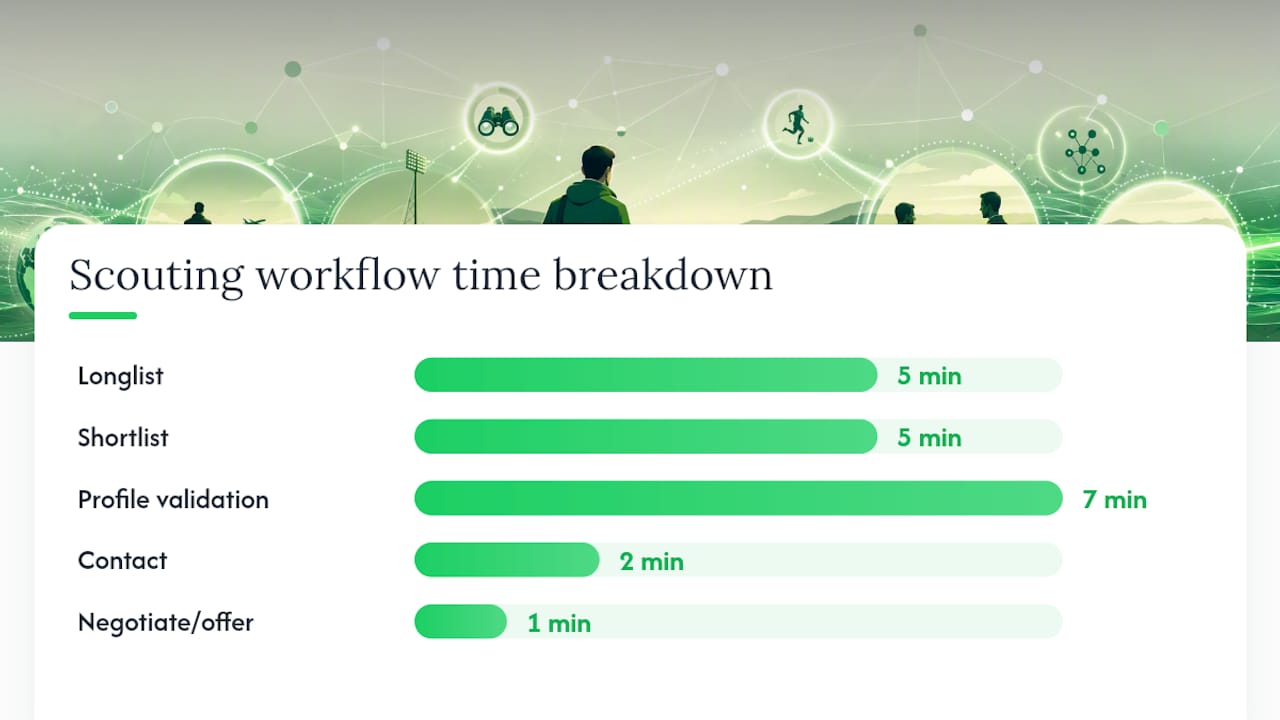
Run this sequence every window and scouting becomes a 20-minute habit rather than a two-hour rabbit hole.
- Longlist (5 min): Apply your role preset. Target 15–25 results. Don't inspect profiles yet.
- Shortlist (5 min): Sort by your primary metric. Add the top 8–12 to your shortlist. Remove anyone whose age or contract situation doesn't fit your plan.
- Profile validation (7 min): Open each shortlisted player. Check ability analogue, role fit score, recent minutes, and injury flag. Cut anyone with a thin profile or a data freshness warning.
- Contact (2 min): Initiate interest on your top 3. Note their asking price and wage demand.
- Negotiate/offer (1 min): Use Gaffa's wage guidance to anchor your opening offer 10–15% below the player's listed demand. If contract expiry is under 6 months, go lower.
For each stage, one checklist item matters most:
- Longlist: Is the minutes filter set? (Removes noise instantly.)
- Shortlist: Are you sorting by role-specific metric, not overall rating?
- Validation: Does the profile show a recent update timestamp?
- Contact: Is the asking price within your transfer budget?
- Offer: Is the wage within your weekly wage budget after adding this player?
The Draft XI Guide covers squad balance and season simulation if you want to extend this into full squad planning.
How to read a Gaffa player profile: what each field actually tells you
Open a profile and read these fields in order:
- Ability analogue (CA proxy): Current level. Higher means better now.
- Potential analogue (PA proxy): Ceiling. A wide gap between the two signals a player worth developing.
- Role fit: How well the player's attributes map to the position you're recruiting for. Ignore players below 60% role fit unless you're deliberately playing someone out of position.
- Contract and wage: Check both. A great player on a wage you can't afford is a dead end.
- Recent minutes: Low minutes on a strong squad can mean quality; low minutes on a weak squad is a red flag.
- Injury flag: Any long-term injury in the last six months warrants a closer look before you commit.
Fields that need 30 seconds: ability analogue, role fit, contract expiry, wage. Fields that need deeper inspection: positional map (can they cover adjacent roles?), percentile breakdown by metric, and the last-updated timestamp on the profile data.
Before moving anyone from shortlist to offer, confirm the timestamp is recent. A stale profile may not reflect a January loan, a position change, or a fitness issue.
Three ready-made scouting presets to try right now
Paste these directly into Gaffa's filter panel.
Preset A: Pressing striker
| Filter | Value |
|---|---|
| Position | Striker / Forward |
| Minutes | 900+ |
| Pressing efficiency percentile | 70th+ |
| Goals + assists per 90 percentile | 75th+ |
| Age | 20–25 |
Preset B: Ball-playing defensive midfielder
Preset C: Young undervalued prospect
| Filter | Value |
|---|---|
| Age | 18–20 |
| Minutes | 900+ |
| Any role percentile | 75th+ |
| Contract expiry | Under 12 months |
| Market value | Low percentile of position |
Community tools like FM ValueScout use the same archetype-weighted logic: score players against a role template rather than sorting by a single number. Gaffa's presets work the same way inside the browser.
For your shortlist template, include these columns: Name, Age, Role Fit %, Primary Metric Percentile, Contract Expiry, Wage Demand. Sort by Role Fit first, then primary metric.
What data scouting in Gaffa won't do
Data scouting is a precision filter, not a guarantee. It finds candidates worth inspecting — you still decide who fits your dressing room.
Realistic limits to keep in mind:
- Data freshness: Public datasets refresh on a cycle, not in real time. A player's form from last month may not be reflected yet. Always check the profile timestamp.
- League depth: Gaffa's database covers major leagues well. Lower tiers and smaller nations may have thinner profiles. If a player has under 400 minutes logged, treat the percentiles as provisional.
- Small sample outliers: A striker with 3 goals in 4 games looks elite on per-90 figures. Filter for 900+ minutes to avoid chasing flukes.
Do:
- Test presets on players you already know to calibrate the filters.
- Use percentiles against a consistent comparison pool.
- Revisit your shortlist mid-window as new data refreshes.
Don't:
- Chase a single metric in isolation.
- Ignore tactical fit because the numbers look good.
- Treat a thin profile as a confirmed scouting report.
FMST26 illustrates what players expect from modern scouting tools: percentile engines, live tracking, and custom metrics. Gaffa covers the core of that feature set inside a free, no-login browser game. Genie Scout's page notes that export restrictions push many tools toward in-memory analysis — Gaffa's browser-save approach sidesteps that entirely.
How to turn a Gaffa shortlist into a signing
- Eligibility check: Confirm the player's nationality fits your squad's registration rules.
- Wage vs. budget: Add the player's wage demand to your current wage bill. If it pushes you over budget, stop here.
- Asking price vs. value: Compare the listed asking price to Gaffa's estimated market value. Anything within 15% of value is fair; above 20% over value, negotiate hard or walk.
- Squad role planning: Check your current depth at that position. Signing a third striker when you need a left back is a budget mistake.
- Make the offer: Start 10–15% below asking price. If contract expiry is under 6 months, open at 30% below.
Squad impact checklist before confirming:
- Does this player start, rotate, or develop?
- Does signing them create a logjam that forces a sale elsewhere?
- Is the wage sustainable for the full contract length?
For squad building beyond individual signings, the Draft XI Guide covers season simulation and positional balance.
Where does Gaffa's scouting data come from?
Gaffa pulls from public football datasets, the same open data layer that powers community tools and fan analytics projects. Player attributes, contract information, and performance metrics refresh on Gaffa's internal update cycle. The last-updated timestamp on each profile tells you how current that specific record is.
Privacy is straightforward:
- No account required. Nothing is stored server-side tied to your identity.
- Browser-local saves. Your squad, shortlist, and settings live in your browser's local storage.
- No external telemetry beyond standard ad-display events (Gaffa is ad-supported and free to play).
Your scouting data stays in your browser. Close the tab, reopen it, and your shortlist is still there — no login, no sync, no account wall.
To back up a browser save, export your browser's local storage data or use your browser's built-in profile sync if you want to move between devices. It's low-tech but it works.
The Football Manager Scouting GitHub project shows how community developers build radar charts and indexed CSVs from exported data — a reminder that the underlying data workflows Gaffa uses are well-established across the football gaming community.
The case for keeping data scouting simple
Most players who burn out on scouting do it by layering too many filters, chasing too many metrics, and second-guessing every shortlist. The players who get consistent results do the opposite: they pick two or three role-specific metrics, run the same preset every window, and trust the process.
Repeatable systems beat one-off deep dives. Every time. A shortlist built on the same template each window is comparable across windows — you can actually see whether your recruitment is improving. A different approach each time gives you no baseline.
The data is there to narrow the field, not to make the decision for you. Use it to get from 200 players to 15. Then use your football brain to get from 15 to 1.
Gaffa is free, no login, and ready to play right now
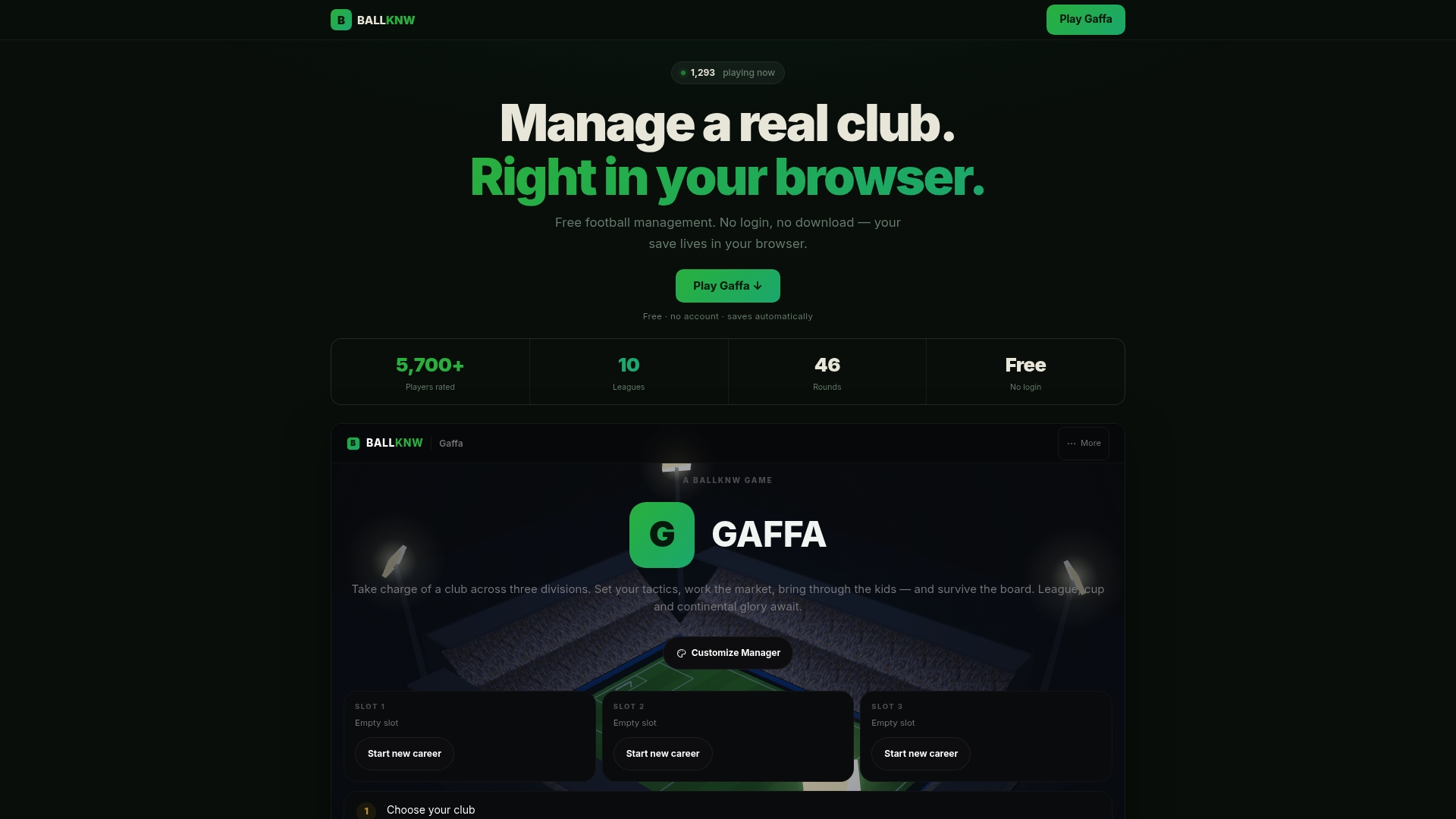
Gaffa on Ballknw gives you a full football management simulation — Scout Hub, transfer tools, tactical setup, board objectives — without an account or a download. Open it in your browser, load a club, and run Preset A on your first session. The whole longlist-to-shortlist cycle takes under 20 minutes.
If you play on mobile, Ballknw also covers the best football manager games for iPhone and Android for sessions away from your desktop. Everything is free, everything is in-browser, and the Scout Hub is waiting.
Sources
- Football-Manager-scouting · GitHub
- FMST26 real-time scouting companion (FMScout)
- Digital Synergy: Innovating Football Manager Tactics in a Data-Driven Era - The Higher Tempo Press